
There is a hidden fee attached to every new chat window you open with an AI like Claude or ChatGPT. Every time you find yourself typing, “Act like a senior copywriter,” or “Keep it strictly to bullet points,” or “Use a punchy, direct tone,” you are paying it.
You type out your elaborate context. The AI does exactly what you ask. You close the tab.
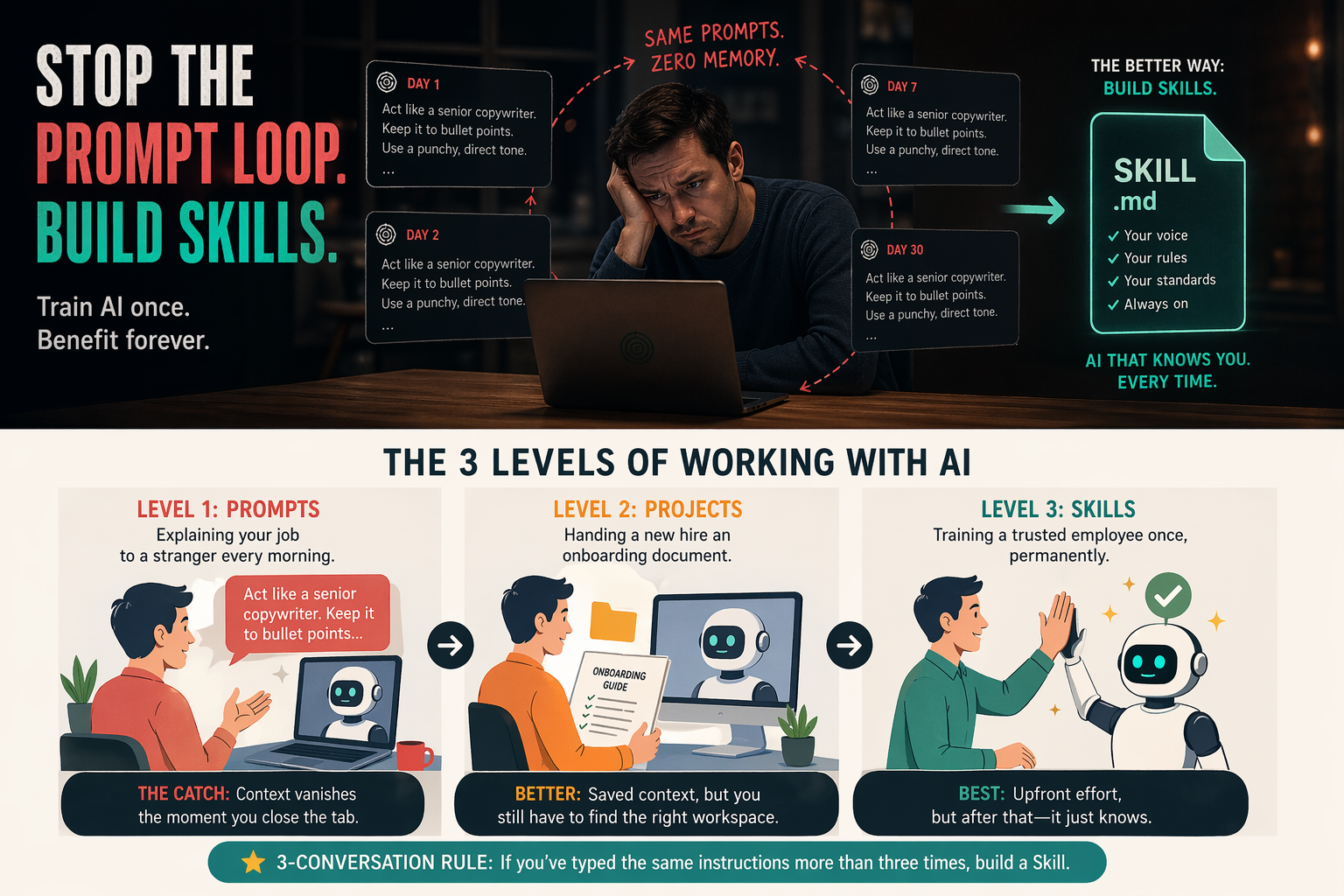
The next day, you open a new session, and the AI has complete amnesia. You are back at square one, typing the exact same instructions you typed yesterday. This is the prompt loop, and if you use AI for work, you are probably trapped in it.
There is a better way. It is called building Skills, and once you understand the difference, you will never go back to writing the same prompts on repeat.
Think of It Like Hiring Someone New Every Single Day
Here is an analogy that makes this click immediately.
Imagine you run a small business and you need help writing your weekly newsletter. You hire a freelancer. On Day 1, you spend 30 minutes explaining your brand voice, your audience, your formatting preferences, and what topics to avoid. They do a great job.
On Day 2, a completely different person shows up. Same role, zero memory of yesterday’s conversation. You spend another 30 minutes re-explaining everything.
That is exactly what happens when you rely purely on prompts. Most people just accept it as “how AI works.” It does not have to be.
The Three Levels of Working with AI
Most people never move past the first level. Here is what all three look like:
| Level | Method | What it feels like | The catch |
|---|---|---|---|
| 1 | Prompts | Explaining your job to a stranger every morning | Context vanishes the moment you close the tab |
| 2 | Projects | Handing a new hire an onboarding document | Better, but you still have to navigate to the right workspace each time |
| 3 | Skills | Training a trusted employee once, permanently | Upfront effort, but after that — it just knows |
Prompts do not compound. If you write the same context 15 times over a month, you are no faster on Day 30 than you were on Day 1. Your output quality depends entirely on whether you remembered to include the right instructions today.
So What Exactly Is an AI Skill?
A Skill is not a prompt. Here is the cleanest way to think about it:
- A prompt tells the AI what to do right now, in this session.
- A Skill tells the AI how to behave every time, permanently.
Technically, a Skill is just a text file that contains your preferences, constraints, and instructions. You write it once, give it to the AI, and from that point forward it absorbs those instructions as baseline behavior.
Here is a simple rule to know when you should stop prompting and start building: The 3-Conversation Rule. If you have typed the same instructions into a chat window more than three times, stop retyping. Build a Skill.
A Real Example: The Hook Generator
Say you regularly create content — blog posts, social media captions, YouTube videos. Every time you start writing, you need a strong opening line that grabs attention. Instead of explaining what makes a “good hook” to the AI every single time, you build a Skill that already knows.
Here is what that looks like in plain terms:
You are a hook generator. Every hook should be short, punchy, and driven by curiosity or a surprising data point. Never use generic, clickbait-style hype. Always stay relevant to the specific topic. Output the hook in bold, followed by one optional setup sentence.
Save that as a file. Give it to your AI tool once. Done. You never have to explain “good hook” again.
Five Skills Worth Building This Weekend
You do not need to be a developer to build these. Each one is just a plain text file with clear instructions.
- The Tone Enforcer: A file dedicated to your writing voice. Tell the AI to strip out passive sentences, corporate filler words, and the vague AI-isms that make everything sound the same (delve, tapestry, testament — you know the ones).
- The Meeting Summarizer: Instead of asking the AI to “summarize my notes,” build a Skill that always outputs: key decisions made, action items with owners, and open questions. Same format, every time.
- The Deep Research Filter: A constraint that stops the AI from giving you surface-level Wikipedia summaries. Force it to extract non-obvious patterns, highlight surprising data, and skip anything you could find in the first paragraph of a Google search.
- The Email Rewriter: Train it to rewrite your drafts so they are shorter, clearer, and end with a single specific ask. No more walls of text.
- The Skill Builder: The most powerful one of all — a Skill that builds other Skills. You tell the AI: “Create a Skill for writing my weekly metrics report,” and it outputs the full framework for you.
How to Actually Use These Skills
You have three options, depending on what tools you use:
- If you use Claude Code or developer tools: Drop your Skill files into a
.claude/skills/folder. The system picks them up automatically and applies them globally. This is the most powerful option. - If you use Claude.ai Projects: Upload your Skill files into the project’s knowledge base. Every conversation inside that project starts with those instructions already loaded.
- If you just want to try it right now: Paste the raw text at the very top of a new chat before you ask your question. It is temporary, but it works immediately with no setup required.
Stop Typing. Start Investing.
Building a library of Skills takes maybe an hour or two of upfront work. But unlike prompts, Skills compound. Every task you complete after that hour is faster and more consistent than before.
Prompts make you the bottleneck. Every time you forget a parameter, the output suffers. Every time you are in a hurry, you skip the context and get generic results. Skills remove you from that friction entirely.
Pick one workflow you repeat every week. Write a Skill for it. Run it once. You will immediately understand why treating AI as a prompt-receptacle feels, in hindsight, like using a flip phone when a smartphone was sitting right next to it.